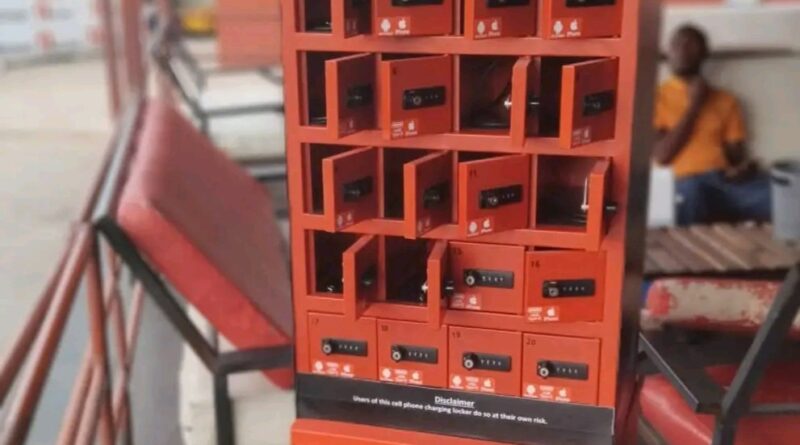
What’s Mobile Cellphone Charging Station and How to Use It
What Is a Mobile Cellphone Charging Station and How Does It Work?
In today’s always-connected world, keeping your phone charged is no longer just a convenience—it’s a necessity. Whether you’re traveling, working, attending an event, or simply going about your daily routine, a dead battery can quickly disrupt your plans. This is where mobile cellphone charging stations come in.
You’ve probably seen them in public places or even used one yourself, but there’s more to these devices than just plugging in your phone. If you’re considering using, buying, or even installing a charging station, it’s worth understanding how they work and what makes them effective.
This guide explains everything in a clear, practical way.
What Is a Mobile Cellphone Charging Station?
A mobile cellphone charging station is a device or system designed to charge multiple smartphones or electronic devices at the same time using a single power source.
Unlike a basic wall charger, these stations are built for efficiency and convenience. Instead of juggling multiple plugs and cables, users can connect several devices in one central location.
You’ll commonly find charging stations in places such as:
- Shopping malls
- Airports
- Restaurants and cafés
- Conferences and large events
- Offices and co-working spaces
They are also becoming increasingly popular in homes, especially in households with multiple devices.
At their core, charging stations are about simplifying access to power—whether for personal use or for serving customers and guests.
How Does a Charging Station Work?
Although charging stations may look complex, the way they function is relatively straightforward. They take electricity from a single source and distribute it safely across multiple devices.
Key Components
Most charging stations include the following essential parts:
1. Power Input
This is where the station connects to an electricity source, typically a wall outlet. Some portable models use internal batteries instead.
2. Charging Ports
These are the connection points for devices. Common types include:
- USB-A ports
- USB-C ports
- Wireless charging pads
3. Power Management System
This is the “brain” of the charging station. It regulates voltage, prevents overheating, and ensures each device receives the appropriate amount of power.
Charging Technologies Used
Not all charging stations deliver power in the same way. The technology used plays a major role in charging speed and efficiency.
Standard USB Charging
This is the most basic method. It works with almost all devices but tends to be slower compared to newer technologies.
Fast Charging (USB Power Delivery or Quick Charge)
Modern stations often support fast charging, which significantly reduces charging time. However, both the device and the cable must support this feature to benefit from it.
Wireless Charging (Qi Technology)
Wireless charging allows users to place their phones on a pad instead of plugging in a cable. It’s convenient but usually slightly slower than wired fast charging.
💡 It’s important to note that charging speed depends on the station’s power output (wattage), not just the number of ports.
Types of Mobile Charging Stations
Charging stations come in different forms depending on where and how they are used.
1. Public Charging Stations
These are installed in high-traffic areas like malls and airports. They are designed for shared use and often include extra features such as:
- Lockable compartments for device security
- Payment systems for paid charging services
- Digital screens for advertisements
They are built to handle heavy usage and multiple users throughout the day.
2. Portable Charging Stations
Portable stations are commonly used at events, outdoor gatherings, and temporary setups.
Key features include:
- Lightweight design
- Built-in batteries
- Easy transport and setup
These are especially useful where access to power outlets is limited.
3. Desktop Charging Hubs
These are compact charging stations designed for personal use in homes or offices.
They typically offer:
- Multiple USB ports
- Organized cable management
- Small, space-saving designs
They’re ideal for charging several devices overnight or keeping workspaces tidy.
4. Wireless Charging Stations
Wireless stations eliminate the need for cables altogether.
Users simply place their devices on a charging pad. These are popular in modern homes and offices where convenience and minimalism are priorities.
Real-World Use Cases: Why Charging Stations Matter
Understanding where charging stations are used helps explain why they’ve become so important.
In Businesses
Charging stations can directly impact customer behavior.
- Customers stay longer when they can charge their devices
- It improves overall customer experience
- Some businesses generate extra revenue through paid charging services
In competitive environments, small conveniences like this can make a big difference.
At Events
Events rely heavily on mobile devices for communication, navigation, and social media.
Charging stations:
- Prevent attendees from running out of battery
- Reduce stress and frustration
- Add value to the event experience
For event organizers, they’re no longer optional—they’re expected.
At Home
Charging stations are just as useful in everyday life.
- They reduce cable clutter
- Allow multiple devices to charge overnight
- Keep spaces organized
For families with multiple phones, tablets, and accessories, a central charging point is extremely practical.
Benefits of Using a Charging Station
There are several advantages to using a charging station instead of individual chargers.
Charge Multiple Devices Simultaneously
No need to rotate devices or fight over outlets.
Reduce Clutter
One station replaces multiple chargers and tangled cables.
Faster Charging Options
Many stations support modern fast-charging technologies.
Convenience in Shared Spaces
Ideal for homes, offices, and public areas.
Useful in Emergencies
Having a reliable charging source can be critical when communication is important.
Common Mistakes People Make
Despite their usefulness, people often misuse charging stations in ways that reduce performance or even cause damage.
Using Low-Quality Stations
Cheap or poorly made charging stations can:
- Charge devices very slowly
- Overheat during use
- Potentially damage batteries
Investing in a reliable product is important.
Ignoring Power Output
Not all ports deliver the same amount of power.
A low-wattage port will charge devices much more slowly, especially modern smartphones that require higher power for fast charging.
Overloading the Station
Connecting too many devices at once can:
- Reduce charging efficiency
- Cause overheating
- Shorten the lifespan of the station
Always check the recommended capacity.
Using Public Stations Without Caution
While convenient, public charging stations can carry risks if used carelessly.
Are Public Charging Stations Safe?
Generally, public charging stations are safe, but there are a few potential concerns to be aware of.
Data Theft (Juice Jacking)
Although rare, compromised USB ports could potentially access your device’s data.
Malicious Hardware
Some ports may be tampered with or unsafe.
How to Stay Safe
You can reduce risks by following simple precautions:
- Use your own charging cable
- Avoid plugging directly into unknown USB ports
- Consider using a USB data blocker
- Avoid accessing sensitive information while charging
These steps significantly improve safety when using public stations.
Charging Station vs Power Bank
People often confuse charging stations with power banks, but they serve different purposes.
Charging Station
- Requires a fixed power source
- Can charge multiple devices at once
- Best for homes, offices, and public spaces
Power Bank
- Battery-powered and portable
- Limited capacity
- Best for travel and emergencies
Both are useful—it just depends on your situation.
How to Choose the Right Charging Station
If you’re planning to buy a charging station, here are the key factors to consider.
Number of Ports
Think about how many devices you need to charge regularly. More devices require more ports.
Power Output (Wattage)
Higher wattage means faster charging. Look for stations that support modern fast-charging standards.
Safety Features
Choose a station with built-in protections such as:
- Overcharge protection
- Temperature control
- Short-circuit prevention
These features protect both your devices and the station itself.
Build Quality
Durability matters, especially for long-term use. Cheap materials often lead to early failure.
Intended Use
Consider where you’ll use the station:
- Home use requires compact design
- Business use requires durability
- Events may require portability
Choosing the right type ensures better performance and value.
Final Thoughts
Mobile cellphone charging stations have evolved from simple convenience tools into essential solutions for modern life. As our dependence on mobile devices continues to grow, access to reliable charging becomes increasingly important.
Whether used at home, in a business, or at large events, charging stations offer practical benefits that go beyond just powering devices. They improve organization, enhance user experience, and provide peace of mind.
However, not all charging stations are created equal. The real value comes from choosing a high-quality device, understanding how it works, and using it correctly.
When done right, a charging station can make everyday life more efficient, more organized, and far less stressful when your battery starts running low.